

Overview
ReelPik offers flexible subscription plans to help you choose the features that best fit your store.
You can manage your billing cycle, subscription plan, and discount code directly from the ReelPik billing page.
How to Manage Your Billing
Step 1: Open the Billing Page
-
Go to Shopify Admin → Apps → ReelPik Videos → Pricing.
-
Open the Select a plan or Billing page.
Step 2: Choose Your Billing Cycle
At the top of the page, you can choose between:
-
Pay monthly – Pay for your subscription each month.
-
Pay yearly – Pay annually and save 17%.
Select your preferred billing cycle before choosing a plan.
Step 3: Choose a Plan
ReelPik currently offers three plans:
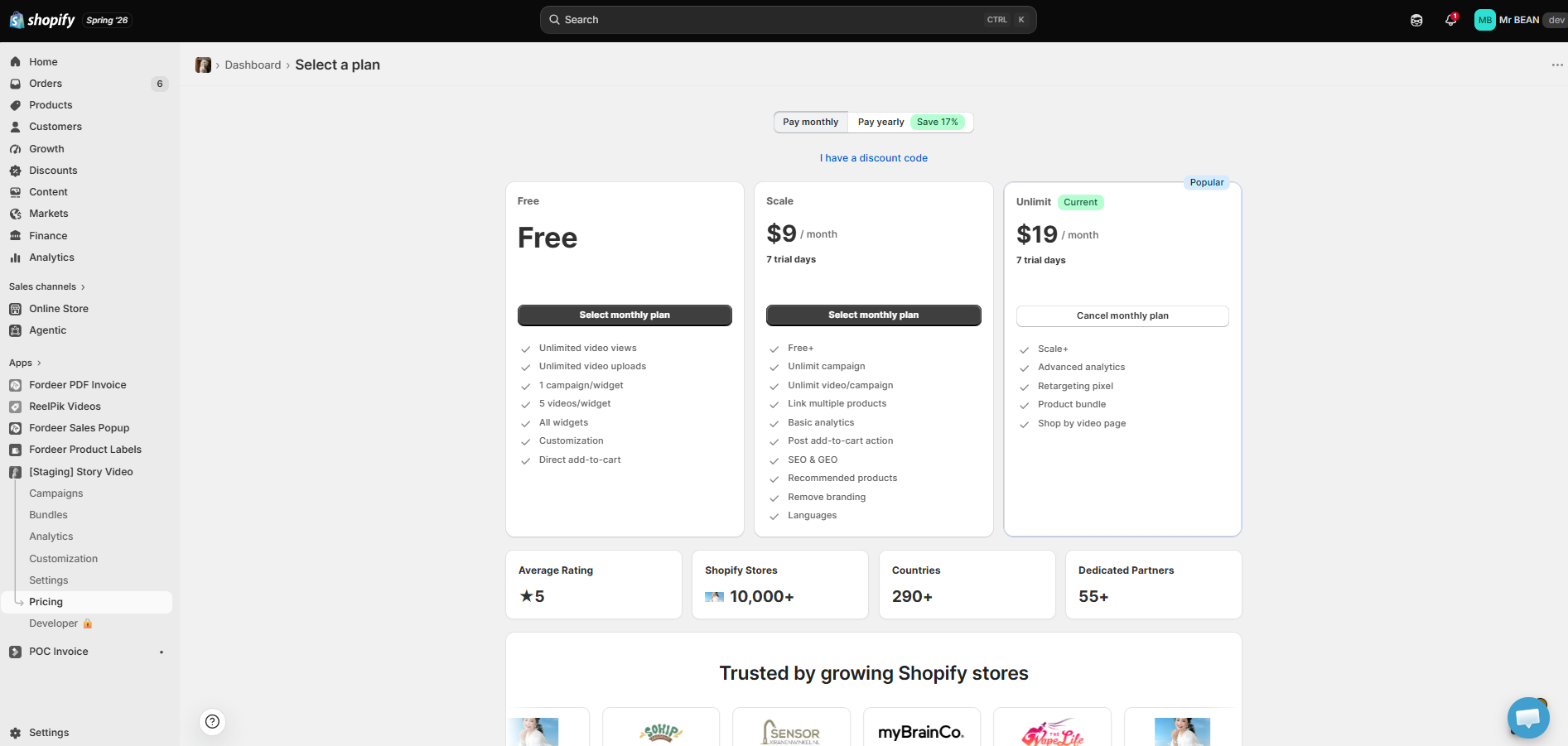
Free: The Free plan includes:
-
Unlimited video views
-
Unlimited video uploads
-
1 campaign/widget
-
Up to 5 videos/widget
-
All widgets
-
Customization
-
Direct add-to-cart
Scale – $9/month: The Scale plan includes everything in Free, plus:
-
Unlimited campaigns
-
Unlimited videos per campaign
-
Link multiple products
-
Basic analytics
-
Post add-to-cart action
-
SEO & GEO
-
Recommended products
-
Remove branding
-
Multiple languages
The Scale plan also includes a 7-day free trial.
Unlimit – $19/month: The Unlimit plan includes everything in Scale, plus:
-
Advanced analytics
-
Retargeting pixel
-
Product bundles
-
Shop by video page
The Unlimit plan also includes a 7-day free trial.
Step 4: Apply a Discount Code
If you have a discount code, click I have a discount code and enter your code before selecting your plan.
Step 5: Confirm Your Subscription
Click Select monthly plan or the corresponding button for your chosen billing cycle and follow the Shopify billing confirmation steps.
Your subscription will be managed through Shopify.
How to Cancel Your Subscription
If you are currently subscribed to a paid plan, you can return to the Select a plan page and click Cancel monthly plan (or the corresponding cancellation option for your billing cycle).
Your subscription status will then be updated according to Shopify's billing process.
30-Day Money-Back Guarantee
ReelPik also offers a 30-day money-back guarantee. You can try the app risk-free, and if you're not satisfied, you may request a full refund within 30 days.
Note: Plan features and pricing may change over time. Please refer to the billing page in your Shopify admin for the latest available plans and pricing.
We value your feedback — it helps us continuously improve our apps and provide you with a better experience.
🖥️ Demo store: Check out here: https://reelpik.myshopify.com with password: 1
👉 Chat with us: Share your feedback directly with our team.
👉 Email us: hi@reelpik.com
👉 Explore more apps: Discover more Fordeer apps.
👉 Join our community: Join ForDeer Community to get the latest updates, tips, and special deals.
🕐 Working hours: 8:30 AM – 5:00 PM (UTC+7), Monday–Friday.
We typically reply to live chats within minutes and emails within a few hours.
Need help? Feel free to reach out anytime via live chat or email!