

Overview
Make your ReelPik videos easier for search engines and AI shopping agents to understand, discover, and use when recommending your products.
With ReelPik, you can add metadata to your videos to support two important goals:
-
SEO (Search Engine Optimization): Help search engines better understand your video content and improve its visibility in search.
-
GEO (Generative Engine Optimization): Provide AI shopping agents with additional context about your video and products so they can better understand and recommend them.
SEO vs. GEO: What's the Difference?
| SEO | GEO | |
|---|---|---|
| Designed for | Search engines | Generative AI & AI shopping agents |
| Main goal | Improve search visibility | Improve AI understanding and discovery |
| Uses | Title, description, thumbnail, upload date | Video content + product context + metadata |
| Example | Helping Google understand your video | Helping an AI agent understand which product your video features |
Using both helps your ReelPik videos become more accessible across traditional search and emerging AI-powered shopping experiences.
How to set up SEO Metadata
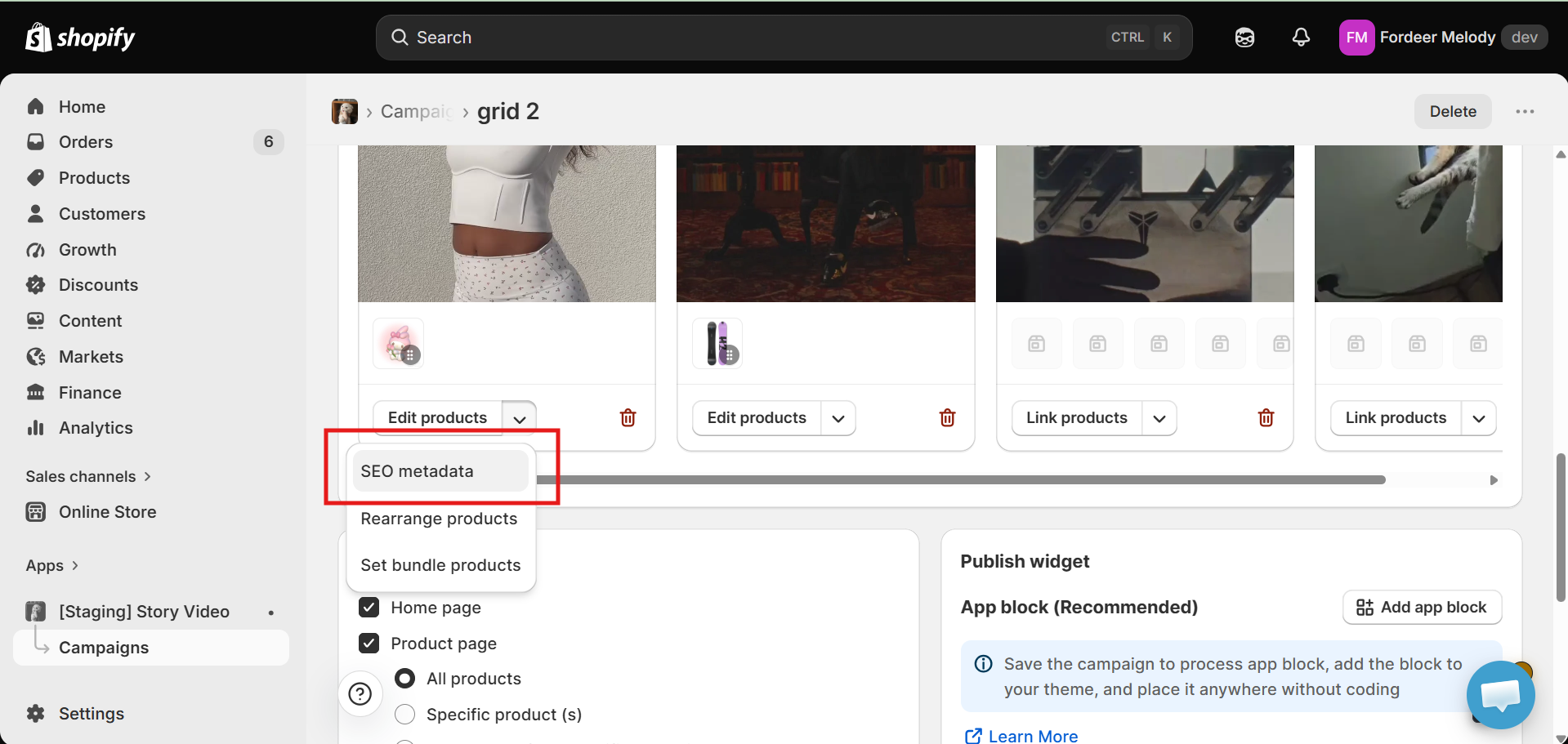
Step 1: Open your campaign
-
Go to ReelPik Videos → Campaigns.
-
Open the campaign you want to edit.
-
On the video card, click the ▼ dropdown next to Edit Products.
-
Select SEO metadata.
Step 2: Configure the metadata
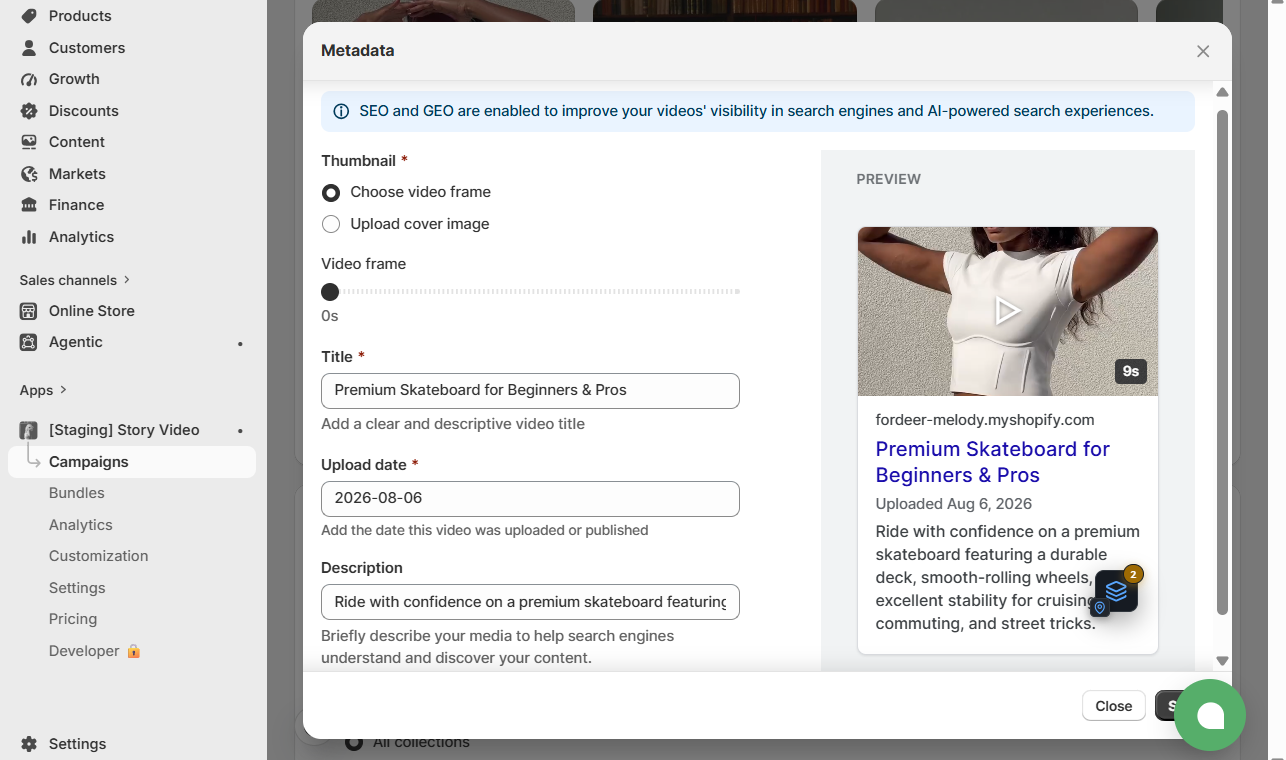
A Metadata popup will appear with the following fields:
1. Thumbnail (Required)
Choose the image that will represent your video in search results.
You can either:
-
Choose video frame – Select any frame from the video using the timeline.
-
Upload cover image – Upload a custom thumbnail.
2. Title (Required)
Enter a descriptive title that clearly explains the video content.
Example: Premium Skateboard for Beginners & Pros
3. Upload Date (Required)
Select the date when the video was uploaded or published.
4. Description
Provide a short description to help search engines understand your video.
Example: Ride with confidence on a premium skateboard featuring a durable deck, smooth-rolling wheels, and excellent stability for cruising, commuting, and street tricks.
Step 3: Save your changes
Click Save to apply the metadata.
A preview panel on the right shows how your video information may appear in search results.
How to use GEO Metadata
Once your SEO Metadata is configured, you can use your ReelPik videos as an additional source for AI-generated product information.
Step 1: Complete your video metadata
Before using ReelPik Video as a GEO source, make sure your videos have a relevant Description.
The detail gives AI systems more context about the content of your video.
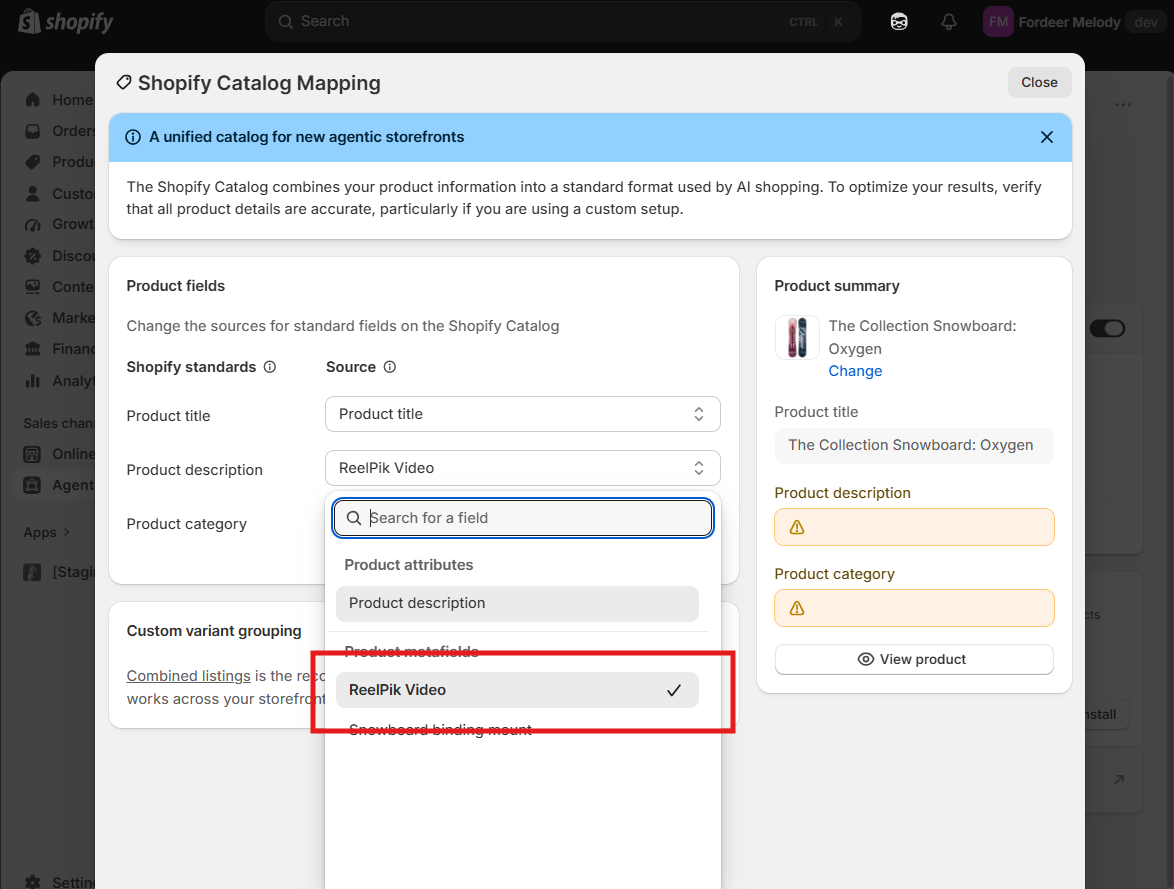
Step 2: Select ReelPik Video as a product description source
-
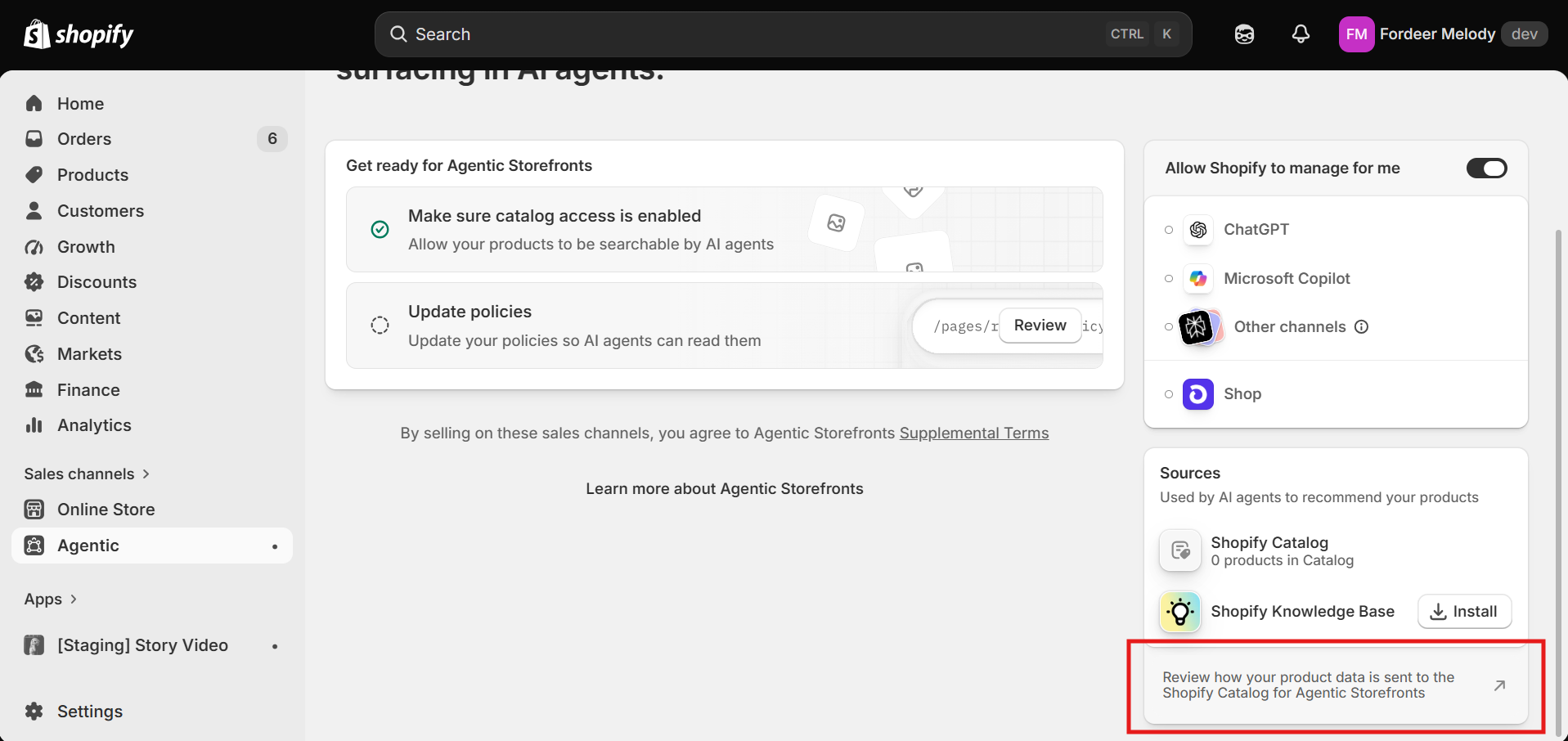
Go to Agentic.
-
Find Product Description.
-
Select ReelPik Video as a source.
-
Save your changes.
Your ReelPik video content can then be used as additional context for generating product descriptions and supporting AI-powered product discovery.
Tip: Make sure each video is connected to the correct products in ReelPik. Accurate product-to-video relationships help AI systems understand which products are featured in your content.
Best Practices for SEO & GEO
1. Write descriptive titles
Clearly explain what shoppers will find in the video.
Good:
Premium Running Shoes for Everyday Training
Avoid:
Video 01
2. Use relevant keywords naturally
Include keywords that accurately describe the video and product.
For example:
-
Running shoes
-
Wireless headphones
-
Leather handbag
-
Summer dress
-
Premium skateboard
Avoid keyword stuffing or adding irrelevant keywords.
3. Write useful descriptions
Keep descriptions concise but informative. We recommend around 100–160 characters when possible.
Focus on information that helps both shoppers and AI systems understand the product.
4. Use a clear thumbnail
Choose a high-quality image that accurately represents the video and featured product.
5. Connect videos to the right products
Make sure the products linked to your video are actually featured or relevant to the content.
This is particularly important for GEO because AI systems need accurate context when generating product information or making recommendations.
Important Notes
-
Title, Thumbnail, and Upload Date are required fields.
-
Description is optional but strongly recommended.
-
Updating SEO Metadata does not change the products linked to your video.
-
Updating metadata does not change how your video is displayed in your ReelPik campaign.
-
SEO and GEO metadata do not guarantee higher search rankings or AI recommendations.
-
Search engines and AI platforms may need time to crawl, process, and update information after changes are published.
Give your videos the context they need to be discovered by both search engines and the next generation of AI-powered shopping experiences.
We value your feedback — it helps us continuously improve our apps and provide you with a better experience.
🖥️ Demo store: Check out here with password: 1
👉 Chat with us: Share your feedback directly with our team.
👉 Email us: hi@reelpik.com
👉 Explore more apps: Discover more Fordeer apps.
👉 Join our community: Join ForDeer Community to get the latest updates, tips, and special deals.
🕐 Working hours: 8:30 AM – 5:00 PM (UTC+7), Monday–Friday.
We typically reply to live chats within minutes and emails within a few hours.
Need help? Feel free to reach out anytime via live chat or email!