

Overview
At ReelPik Shoppable Videos, we’re always looking for ways to improve the app and make it more useful for your business.
If there’s a feature you’d like to see in ReelPik, you can submit your idea directly to our team. Your feedback helps us understand what merchants need and allows other ReelPik users to vote for the features they would also find valuable.
There are two ways to request a feature:
-
Submit your idea through the Request features section in ReelPik.
-
Contact our Support Team via live chat or email.
How to request a feature?
Method 1: Submit a request from the ReelPik app
The easiest way to share a feature request is directly from your ReelPik dashboard.
Step 1: Open the Request features section
-
From your Shopify admin, go to Apps → ReelPik Videos.
-
Open the ReelPik Dashboard.
-
Scroll down until you find the Request features section.
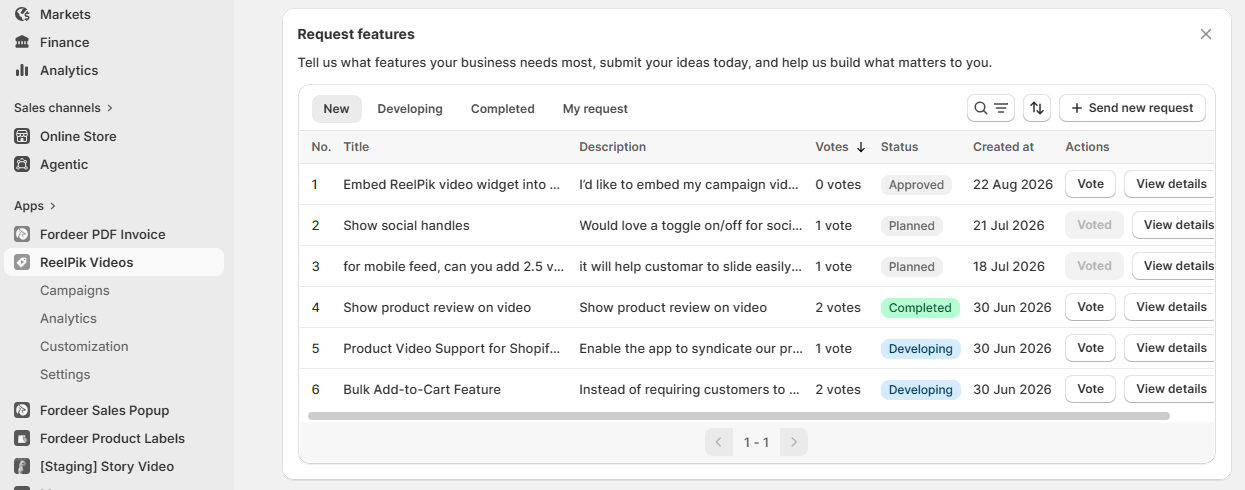
Here, you can browse feature requests submitted by other merchants and see their current status.
Step 2: Check existing feature requests
Before submitting a new request, we recommend checking whether another merchant has already requested the same or a similar feature.
You can browse requests using the available tabs:
-
Rejected – The request has been reviewed but will not be added to the public feature request list.
-
Approved – The request has been reviewed and approved to appear on the feature request board, where other merchants can view and vote for it. This does not mean the feature is confirmed for development.
-
Planned – The feature has been added to our development plan.
-
Developing – Our team is currently working on the feature.
-
Completed – The feature has been developed and released.
You can also use the Search option to find a specific feature.
Tip: If you find an existing request that matches what you need, you don't need to create another one. Simply click Vote to let our team know that this feature is important to you too.
Step 3: Submit a new feature request
If you can't find an existing request that matches your idea:
-
Click Send new request.
-
Enter the details of the feature you'd like us to add.
-
Explain how the feature would help your store or improve your ReelPik experience.
-
Submit your request.
When describing your idea, we recommend including as much relevant information as possible. For example, tell us what you'd like the feature to do, where you'd expect to use it, and what problem it would solve for your business.
This helps our team better understand your use case and evaluate your request.
Step 4: Track your request
After submitting your request, you can check the My request tab to keep track of your submitted ideas.
Feature requests may have different statuses depending on their progress, such as:
-
Approved
-
Planned
-
Developing
-
Completed
Note: Submitting or voting for a feature helps us understand merchant demand, but it does not guarantee that the feature will be developed or provide a specific release date. Our team reviews requests based on merchant needs, feasibility, impact, and product priorities.
Method 2: Contact our Support Team
If you'd prefer to discuss your idea with us directly, you can also send your feature request to our Support Team.
Option 1: Live chat
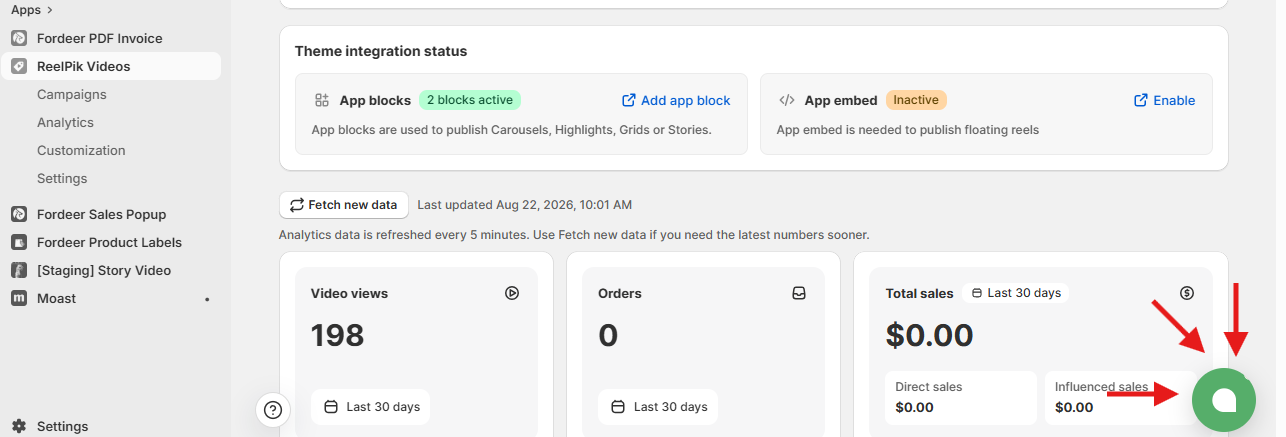
Click the chat icon in the bottom-right corner of the ReelPik app to start a conversation with our team.
Tell us:
-
What feature you'd like ReelPik to have.
-
How you'd like the feature to work.
-
Why the feature would be useful for your store.
-
Any examples, screenshots, or references that can help us better understand your idea.
Our Support Team will review your request and share the feedback with the appropriate team.
Option 2: Email
You can also send your feature request to hi@reelpik.com.
When contacting us by email, please include a clear description of the feature and your use case. Screenshots, examples, or links are also helpful if they demonstrate the functionality you're looking for.
Tips for submitting a helpful feature request
The more context you provide, the easier it is for our team to understand what you need.
When submitting a feature request, consider including:
-
What you need – Describe the feature or functionality.
-
Why you need it – Explain the problem you're trying to solve.
-
How you expect it to work – Describe your ideal workflow.
-
Where you need it – For example, Campaigns, Analytics, Customization, or another part of ReelPik.
-
Examples – Share screenshots, videos, links, or examples from other tools when relevant.
For example, instead of requesting:
"Please add more customization."
You could explain:
"I'd like an option to change the spacing between videos in a Grid campaign so that I can better match the video section with my Shopify theme."
Providing this context helps our team understand your request more accurately.
We value your feedback — it helps us continuously improve ReelPik and provide you with a better experience.
🖥️ Demo store: Check out here with password: 1
👉 Chat with us: Share your feedback directly with our team.
👉 Email us: hi@reelpik.com
👉 Explore more apps: Discover more Fordeer apps.
👉 Join our community: Join ForDeer Community to get the latest updates, tips, and special deals.
🕐 Working hours: 8:30 AM – 5:00 PM (UTC+7), Monday–Friday.
We typically reply to live chats within minutes and emails within a few hours.
Need help? Feel free to reach out anytime via live chat or email!