

Overview
Help shoppers discover more products while watching your ReelPik videos with Product Recommendations.
When enabled, ReelPik displays a “You may also like” section in the video player, showing recommended products based on Shopify's product recommendation API.
This allows shoppers to explore related products without leaving the video shopping experience.
How to enable Product Recommendations
Step 1: Open Video Player customization
-
Go to ReelPik Videos → Customization.
-
Find the Player section.
-
Click Customize.
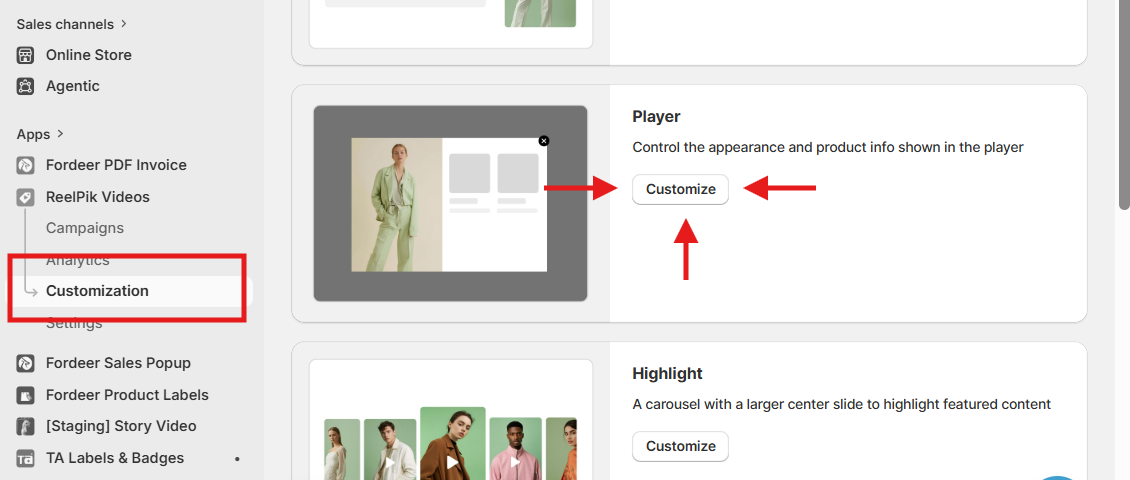
You will be redirected to the Video Player customization page.
Step 2: Enable Product Recommendations
In the Settings panel:
-
Find Product details settings.
-
Enable Show product recommendations.
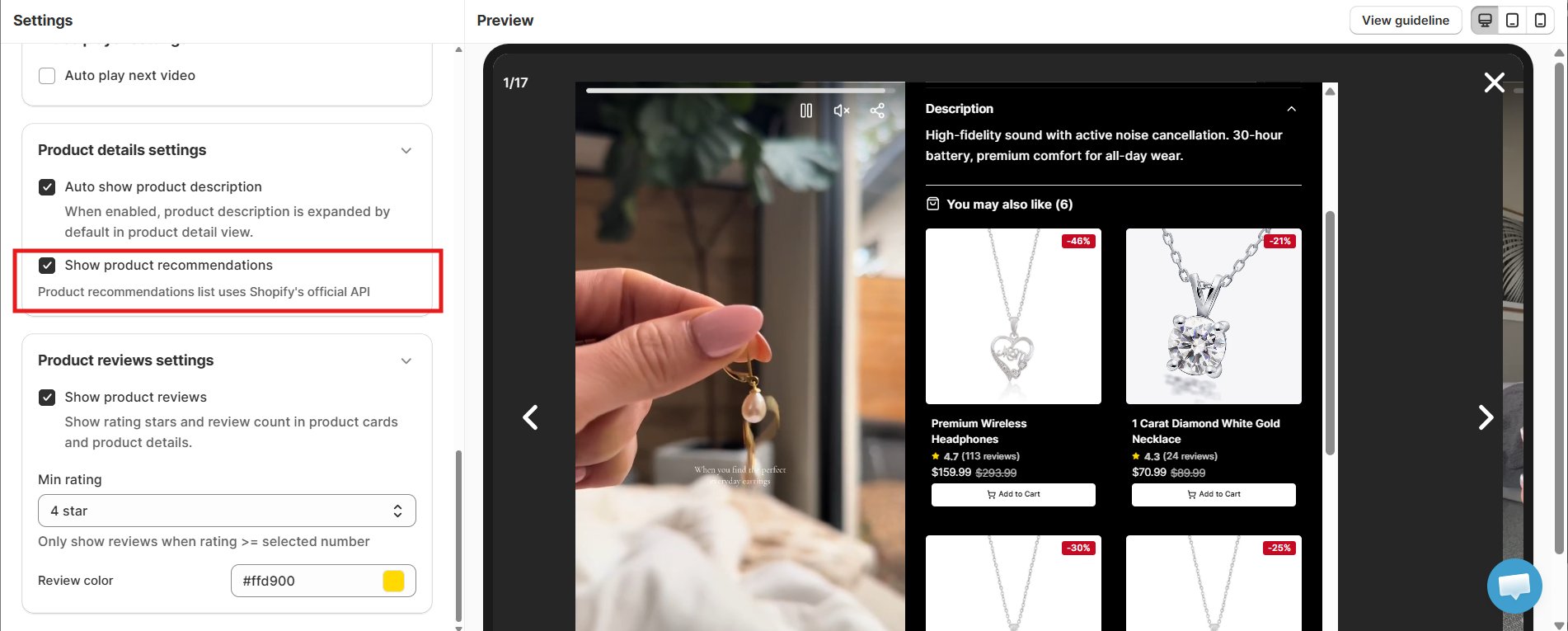
Once enabled, ReelPik will use Shopify's official Product Recommendations API to determine which products to display.
Note: You don't need to manually select recommended products. ReelPik automatically retrieves product recommendations from Shopify.
Step 3: Save your changes
After enabling the setting:
-
Review the preview on the right side.
-
Click Save in the top-right corner.
You can use the preview to see how the recommended products will appear inside the video player.
Best Practices
1. Keep Product Recommendations enabled
Enable this feature if you want shoppers to discover additional products while watching your videos.
2. Make sure your products have complete information
Since recommendations are delivered via Shopify's official recommendation API, keeping your product catalog well-organized and up to date can help deliver a better shopping experience.
3. Preview before saving
Use the player preview to check how the “You may also like” section looks alongside your video and product information.
Important Notes
-
Product Recommendations are available in the Video Player customization settings.
-
ReelPik uses Shopify's official Product Recommendations API to retrieve recommended products.
-
Recommended products are generated automatically by Shopify.
-
You cannot manually select the products displayed in the recommendation section.
-
You must click Save after enabling the setting for the changes to take effect.
-
The number and products shown may vary depending on Shopify's recommendation results.
We value your feedback — it helps us continuously improve ReelPik and provide you with a better experience.
🖥️ Demo store: Check out here with password: 1
👉 Chat with us: Share your feedback directly with our team.
👉 Email us: hi@reelpik.com
👉 Explore more apps: Discover more Fordeer apps.
👉 Join our community: Join ForDeer Community to get the latest updates, tips, and special deals.
🕐 Working hours: 8:30 AM – 5:00 PM (UTC+7), Monday–Friday.
We typically reply to live chats within minutes and emails within a few hours.
Need help? Feel free to reach out anytime via live chat or email!