
Overview
By default, ReelPik video player shows a small ReelPik logo. If you want your videos to look fully on-brand, you can hide it with the Remove branding setting.
This guide explains which plan includes Remove branding, how to turn it on, and what to check if the logo comes back.
Which plan includes Remove branding?
-
Free: Contact us to remove it for free.
-
Scale ($9/month): Included.
-
Unlimit ($19/month): Included.
See the full comparison in ReelPik pricing plans & features.
How to turn on Remove branding
Step 1: Make sure the feature is enabled for your store
Remove branding becomes available when your store is on the Scale or Unlimit plan, or when our support team has enabled it for you.
Note: Being on the right plan (or having the feature enabled) does not hide the logo automatically. You still need to switch it on in Settings.
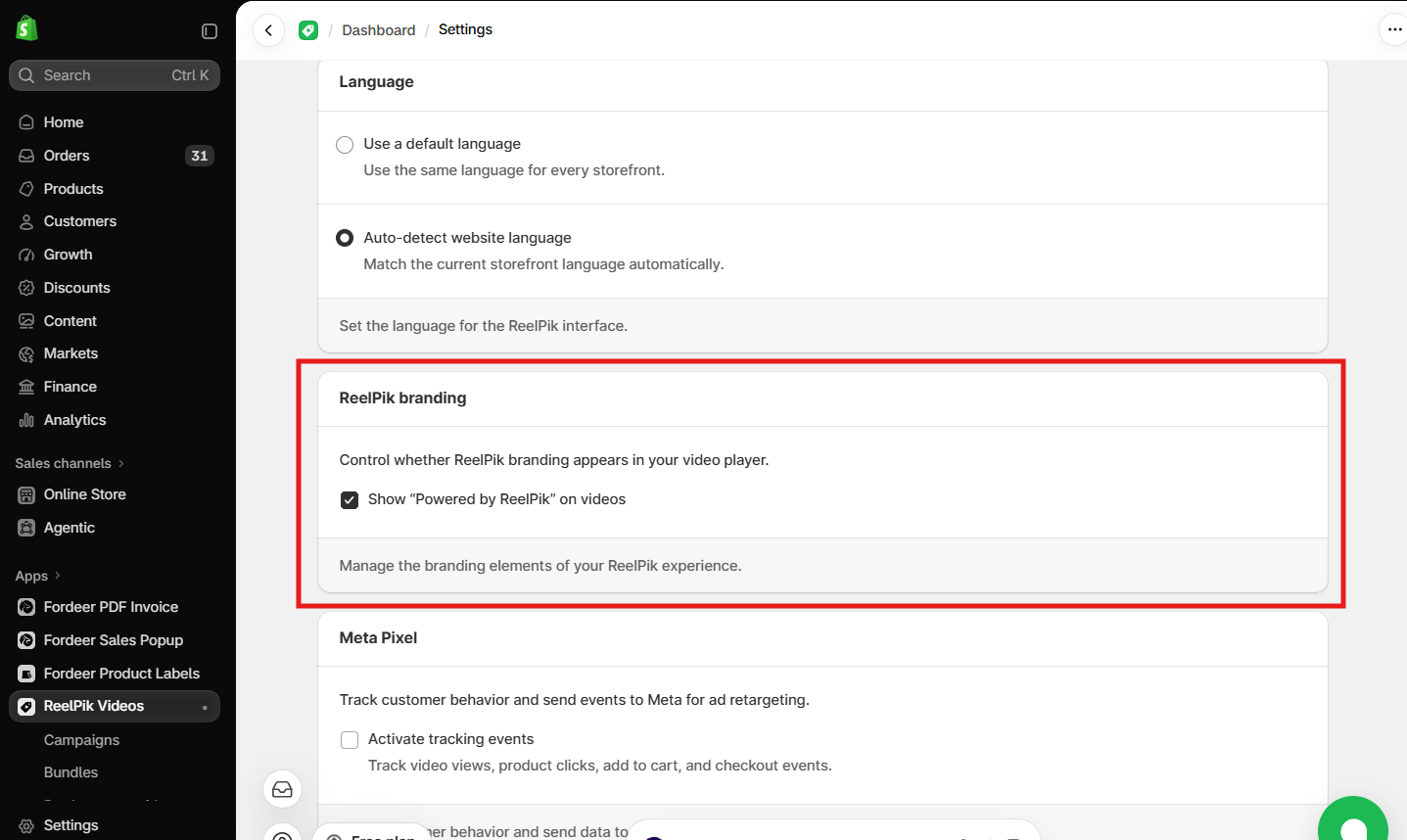
Step 2: Switch it on in Settings
-
From your Shopify admin, open ReelPik Videos → Settings.
-
Find Remove branding and tick the box.
-
Click Save.
Step 3: Check your storefront
-
Open a page on your store where a ReelPik widget is shown.
-
Refresh the page (or open it in an incognito/private window).
-
Open a video and confirm the ReelPik logo no longer appears on the widget or the video player.
The ReelPik logo came back. What should I check?
-
Is the toggle still on? Go to ReelPik Videos → Settings and check that Remove branding is on and saved.
-
Did your plan change? If you downgraded to the Free plan, or a free trial / temporary access has ended, Remove branding is turned off and the logo shows again. Check your plan under ReelPik Videos → Pricing.
-
Is it a cached page? Your browser may still show an older version of the page. Refresh, try an incognito window, or wait a few minutes and check again.
-
Do you have more than one store? Remove branding is set per store. Turn it on in each store's ReelPik Settings.
Still seeing the logo after these checks? Send us a link/screenshot of where the logo appears, and we'll take a look.
We value your feedback — it helps us continuously improve ReelPik and provide you with a better experience.
🖥️ Demo store: Check out here with password: 1
👉 Install ReelPik: Get ReelPik on the Shopify App Store — free plan available.
👉 Chat with us: Share your feedback directly with our team.
👉 Email us: hi@fordeercommerce.io
👉 Explore more apps: Discover more ForDeer apps.
🕐 Working hours: 8:30 AM – 5:00 PM (UTC+7), Monday–Friday.
We typically reply to live chats within minutes and emails within a few hours.
Need help? Feel free to reach out anytime via live chat or email!